Command Line Arguments
Every time an environment is created, an associated configuration file is created as well. As all parameters can be specified by command line argument, (see Crop, Soil, and Agromangement Config), it is easy to lose track of how data was generated, or what environment an Agent was trained on. See Environment Creation for more information.
It is desirable to rerun a simulation with the same (or similar) parameteres. Thus, we support loading an environment configuration. To do so, use the following command line argument:
python3 test_wofost.py --save-folder test_new --load_config_fpath test/config.yaml
This will load the configuration at /test/config.yaml if it exists, and save a new configuration in test_new/.
We can also load a configuration and modify its existing parameters. For example:
python3 test_wofost.py --save-folder test_new/ --load_config_fpath /test/config.yaml --npk.ag.latitude 60
This will load the configuration at /test/config.yaml, modify the Agromanagement latitude parameter, and save a new configuration in test_new/ while running a simulation.
Note
Agent specific arguments are described in Training RL Agents
Data generation specific arguments are described in Generating Data
Gym Environment specific arguments are described in Environment Configuration
Gym Environment Configuration
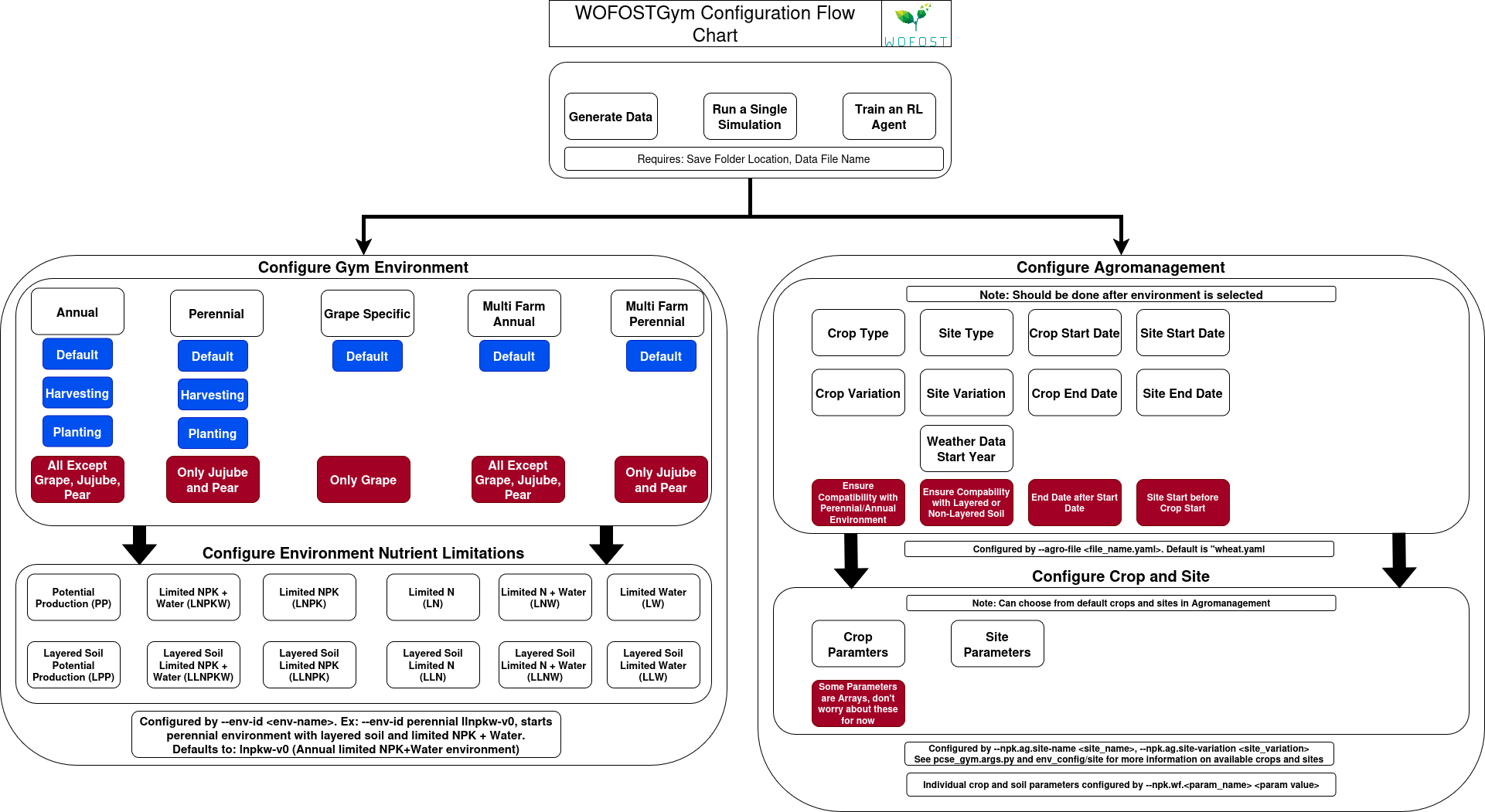
WOFOST-Gym supports a variety of Gymansium environments to handle different types of crop simulations. For the full list of available environments see Available Environments.
Environments can be specified with the command line argument:
python3 test_wofost.py --save-folder test/ --env-id lnw-v0
This script will run a simulation as specified by the agromanagement file in a Limited Water setting.
Caution
Perennial crops (pears, jujubes) are only compatible with Perennial Gym Environments. Likewise,
grape crops are only compatible with Grape environments. Check that the agromanagement file
loaded is compatible with the Gymnasium Environment specified.
The reward function can also be specified by command line. See Environment Wrappers.
Crop, Soil, and Agromangement Config
While all necessary simulation configuration can be done through the agromanagement, soil and crop YAML files,
there are instances where it can be useful to run a quick simulation with only one or two parameters changed. In this case, it is
very handy to have command line configuration.
Every argument in the Agromanagement Template, Soil Template, and Crop Template YAML can be passed via a command line argument and will be overridden when running the simulation.
As an example, suppose that we want to change the max_duration to 400 parameter in the agromanagment arguments. We would run:
python3 test_wofost.py --save-folder test --npk.ag.max-duration 400
Likewise, we can change soil and crop parameters. Suppose we want to change the soil parameter CRAIRC to 0.20 which controls the critical soil air content for aeraition, and the
crop parameter TBASEM to 5 which controls the lower threshold for emergence. We would run:
python3 test_wofost.py --save-folder test/ --npk.wf.CRAIRC 0.20 --npk.TBASEM 5
Important
agromanagement arguments are modified by:
--npk.ag.<PARAMETER>
meanwhile, all soil and crop arguments are modified by:
--npk.wf.<PARAMETER>
Configuration Flow Chart